How view works
pydantic-ai-viz view draws your agents and graphs from their source code. The files are read as text and parsed with Python's own parser. They are never imported and never executed. pviz.analyze(...) does the same from Python and returns the blueprints as data.
You do not need this page to use view. It is here for when you want to know what was read, why a value shows up as code instead of a value, or whether it is safe to point view at a repository you have not reviewed.
Three consequences are worth knowing first:
- Nothing in the code runs. Not the top-level code, not a decorator, not a default argument, not an
import. Pointingviewat a local directory is as safe as opening it in an editor. (Fetching a GitHub target runsgit, with your git configuration.) - Nothing the code imports has to be installed. A file that starts with
from dotenv import load_dotenvis read the same whether or notpython-dotenvis there. Providers, API keys and environment variables do not matter either. - Only what the source spells out is known.
Agent("openai:gpt-5.2")names its model.Agent(get_model())does not, unlessget_modelreturns a value written in your code, and otherwise the viewer shows the expressionget_model()instead of pretending to know what it returns.
The rule behind the third point runs through the whole analyser: a value is reported when the source states it, and the source text is reported when the source computes it. Nothing is guessed.
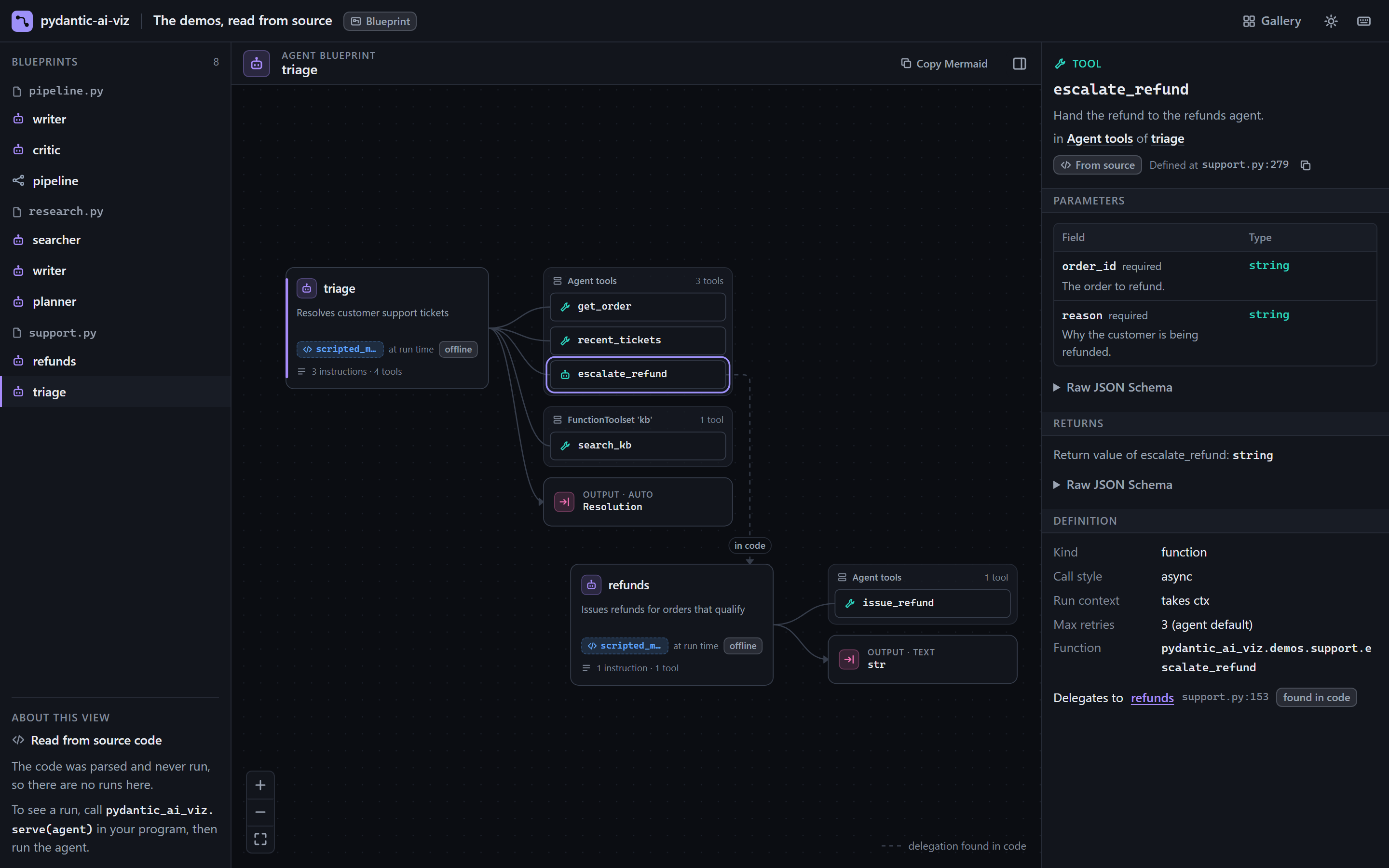
pydantic-ai-viz view src/pydantic_ai_viz/demos shows them. Every part says where it is defined; the edge from escalate_refund to refunds was found by reading the tool's code.The pipeline
flowchart LR
    T["Target<br>file, directory,<br>module or GitHub"] --> L["Locate<br>the .py files"]
    L --> P["Parse<br>ast.parse"]
    P --> I["Index<br>scopes and names"]
    I --> R["Resolve<br>one evaluator,<br>across files"]
    R --> F["Find<br>Agent, GraphBuilder,<br>tools, toolsets"]
    F --> B[("Blueprints<br>source: code")]
    B --> V["Viewer"]
    B --> E["HTML export"]
    B --> A["Analysis<br>(Python)"]
R -. "imports between<br>your own files" .-> L- Locate. The target becomes a list of
.pyfiles: one file, every file below a directory, the file of a module name, or a GitHub repository fetched withgit. Nothing is imported to find a module: its file is looked for on disk. - Parse. Each file is decoded the way Python decodes source (UTF-8, or the encoding the file declares) and handed to the standard-library
astmodule, which produces a syntax tree. Parsing is not running: no statement is evaluated. A file that is too large, cannot be decoded or is not valid Python is skipped, and the reason becomes a notice. - Index. The tree is walked once to record which names each scope binds: assignments,
def,classand imports, per module, function and class body. A name that only running the code could give a value, such as a loop variable or a function parameter, is recorded as unknown. - Resolve. Whenever the analyser needs to know what an expression stands for, one general evaluator follows it through the code (next section). An import of one of your own files pulls that file in, so the evaluator can follow a name into it.
- Find. Every call of Pydantic AI's
Agent, and of pydantic-graph'sGraphBuilderorGraph(nodes=[...]), is a blueprint. A call counts only when its name can be traced to an import frompydantic_aiorpydantic_graph: a class of your own that happens to be calledAgentis not an agent. Decorators and registration calls (@agent.tool,@agent.instructions,toolset.add_function(f),builder.add(...)) are traced back to the construction they belong to. - Describe. Each argument becomes a value when the evaluator can read it, and source text when it cannot.
Every blueprint made this way has source: "code" (see the three provenances), and everything in it carries the file and line it was found at, so the viewer can say "Defined at agents.py:42".
How values are resolved
The analyser knows two kinds of things, and keeps them apart.
What Pydantic AI means. The public API of pydantic_ai and pydantic_graph, and the parts of pydantic, dataclasses and typing that define types: what each Agent argument is, what @agent.tool and Tool(...) register, which classes are toolsets and output markers, how GraphBuilder numbers its nodes, how a BaseModel or a TypedDict becomes a JSON Schema. This is the only library knowledge in the analyser.
What Python means. Everything else is read by one evaluator of the language, the same way for every project, whatever its coding style:
| It follows | For example |
|---|---|
| Names, assignments and unpacking | MODEL = "openai:gpt-5.2", FAST, DEEP = "gpt-5-mini", "gpt-5.2" |
| Imports and re-exports between your files | from app.config import MODEL, a name re-exported by a package's __init__.py, from .tools import * |
| Attributes of modules, classes and instances | config.MODEL, Settings.model, self.config.model where self.config = Config() |
| Return values of your own functions and methods | def default_model(): return "openai:gpt-5.2" |
| Strings built from known parts | "openai:" + NAME, f"{PROVIDER}:{NAME}", PROMPT.format(role="a pirate") |
| Items of containers written in the source | MODELS["fast"], TIERS[1] |
Arguments passed as **kwargs from a written-out dict |
Agent(MODEL, **COMMON) with COMMON = {"retries": 2} |
| Calls of a function that makes an agent, one agent per call, each with its own arguments | researcher = make("researcher") and writer = make("writer") with def make(name): return Agent("openai:gpt-5.2", name=name) |
| Conditions that are themselves values | [Guard()] if strict else [], where strict is a value the source gives |
| Loops over a written-out sequence | for tool in [search, fetch]: agent.tool_plain(tool) |
| Inheritance | an agent made in a base class's __init__ and given tools by a derived class |
For instance, in
PROVIDER = "anthropic"
MODELS = {"fast": f"{PROVIDER}:claude-haiku-5", "deep": f"{PROVIDER}:claude-opus-5"}


class Config:
    model = MODELS["deep"]


agent = Agent(Config().model)
the model is read as anthropic:claude-opus-5, with no warning.
The evaluator stops where the value stops being written in your code:
- A function's parameters are unknown inside it, except in a function that makes an agent. There, each call of the function is an agent of its own, read with that call's arguments and the defaults it leaves out; calls that end in the same blueprint, such as tests that each call
make_agent(), are shown as one agent. A function with a decorator is read once, since the decorator may hand out one agent for every call. Elsewhere,def make(name): return "openai:" + nameis not followed for a callmake("gpt-5.2"); the model is the expressionmake("gpt-5.2"). - A name assigned in more than one place, for example in both branches of an
if, is not taken for its last value. Which value it holds is decided when the code runs, so a model held by such a name is shown as the name, and tools collected that way come with a warning that some of them depend on a condition. A name that is Pydantic AI'sAgentin one case only, as aftertry: from pydantic_ai import Agentandexcept ImportError: Agent = None, still makes agents, each with a warning that this is decided when the code runs. - Anything from outside your code is never evaluated, except a short list of standard-library calls. See the next two sections.
What shows as decided at run time, and why
A value that depends on something outside the files that were read cannot be known by reading them:
- environment variables (
os.getenv("MODEL", "openai:gpt-5.2"),os.environ[...]), - configuration files, command-line arguments and the network,
- what a function of the standard library or of another installed package returns (
load_config()["model"],json.loads(...)), - settings classes that fill themselves in from the environment.
None of these is evaluated, whichever library it comes from, and no default is taken from them: Agent(os.getenv("MODEL", "openai:gpt-5.2")) does not show gpt-5.2 as the model, because the environment may well say otherwise. A default is a guess about the machine the code will run on, and a picture that shows a guess as a fact is worse than one that says "not known here". An environment variable that is read in one of the ways listed in the next section is named, with the default labelled as a default.
Every such value is reported in the same three ways, with the same wording whatever produced it:
- the field holds the source text of the expression, exactly as written (an instruction keeps its line breaks), and the viewer marks it decided at run time;
- the blueprint's
warningslist says so in one plain sentence, for example "the model is set byget_model(), so it is only known when the code runs"; viewprints how many such warnings there were.
Other things that stay open:
- An instruction function (
@agent.instructions, or a function passed ininstructions=[...]) is listed by name and marked dynamic. - A template. An instruction or system prompt written as an f-string or a
"...".format(...)call is shown whole, as its template: the parts filled in at run time are marked ({today}), and a literal part such as a constant of your code is filled in. The viewer says in one short note that the marked parts are filled in when the code runs; there is no warning, since the text itself is known. - Pydantic AI's defaults. A setting the source does not mention stays empty. The analyser does not fill in what the installed Pydantic AI would use, because the code may be written for another version.
- Tools of MCP servers and dynamic toolsets. They exist only once the server or the code is running. The toolset is one placeholder node, and its tools appear once a run uses them.
- Types from installed packages. An output type defined in another package has no schema; its name is shown.
- A tool wrapped by another decorator first. Under
@agent.tool_plain, a decorator such as@cachedhands Pydantic AI whatever it returns. The parameters are read from thedef, with a warning that names the decorator. - A model configuration that is computed. A pydantic model's
model_config(or class keywords such asextra="forbid") is applied to its schema when it is written out:title,extra,use_attribute_docstringsandjson_schema_extra. A configuration built by a call, or one that sets something likealias_generator, is named in a warning, since the schema it gives is only known when the code runs. - Graph edges added in a loop or by a helper function. The steps are listed, the edges that are written out are drawn, and a warning names the call that could not be followed.
- Agents that the source does not construct: an agent returned by a library function, an
Agentsubclass,Agent.from_spec(...). They are not found. Use--importfor these.
Standard-library calls the analyser evaluates
A few calls of the standard library are understood, because what they do can be read off the source without running anything. The list is short and closed, and a test of the project fails if the analyser starts to use any other:
| Call | What is shown |
|---|---|
os.getenv("X"), os.getenv("X", default), os.environ.get("X"[, default]), os.environ["X"] |
the variable X, read when the code runs, and the default the source gives, labelled as a default |
textwrap.dedent("..."), inspect.cleandoc("...") |
the text, computed by the real function, exactly as Python would |
They are recognised however they are imported: import os, from os import getenv, environ, from textwrap import dedent as dd, and through names and helper functions of your own project.
An environment variable is never shown as its value. The variable's name and the source's default are both known, but which value the variable has depends on the machine the code runs on. So Agent(os.getenv("MODEL", "openai:gpt-5.2")) shows env MODEL on the agent's card, and the panel lists the default as "Default, only if MODEL is not set". The warning says the same in words: "the model comes from the environment variable MODEL when the code runs; the source's default is openai:gpt-5.2". This works through helpers, which is how projects usually write it:
DEFAULT_MODEL = "openai:gpt-5.2-mini"


def model_id() -> str:
    return os.getenv("APP_MODEL", DEFAULT_MODEL)


def get_model() -> OpenAIChatModel:
    return OpenAIChatModel(model_id(), provider=OpenAIProvider(...))


agent = Agent(get_model(), ...)
The agent's model is shown as the class OpenAIChatModel, with its model name from the environment variable APP_MODEL, the default openai:gpt-5.2-mini, and get_model() as what builds it.
The call must be spelled out with literal arguments to be understood. A variable name that is itself computed (os.getenv(name)), a default that is not a literal string, os.getenv("X") or "fallback", or a name such as os that the code assigns again is shown as the expression, as any other value computed at run time. dedent and cleandoc are evaluated only on one literal string; on anything else they are the expression too.
Tools that Pydantic AI defines
Pydantic AI ships ready-made tools, such as duckduckgo_search_tool() in pydantic_ai.common_tools. Their names, descriptions and parameters are not written in your code, and they are not built into the analyser either. They are read, as source, from the installed Pydantic AI: the files of the pydantic_ai package are found from its __path__ and parsed by the same analyser, without importing any of them. Only files of pydantic_ai are opened, never those of another installed package, such as the search client a tool calls.
What is read depends on the version installed where view runs, which can differ from the one your project uses. The tool's panel says which version it was read from, and a warning does too when part of the tool could not be read. A tool whose function is chosen when the code runs, for example by an argument, keeps its name and description; its parameters are shown as unknown.
Because the code is read and not run, it does not have to match the Pydantic AI you have installed. Arguments that earlier releases took are read as what they became: result_type as the output type, mcp_servers as toolsets, builtin_tools as native tools, and Graph(nodes=[...]) as a graph.
Across files
A real project spreads an agent over several files: the model in config.py, the tools in tools.py, the output model in models.py. view follows the imports between your own files, whichever target you give it:
| Target | What is read | Blueprints shown |
|---|---|---|
app/agents.py |
that file, and the files of your project it imports, and theirs | the agents and graphs of app/agents.py |
app/agents.py:support |
the same | support and the agents it delegates to |
app/ |
every .py file below app/, and the files they import |
everything in those files |
app.agents |
the file of that module, found on disk | as for its file |
gh:owner/repo@ref/subdir |
that part of the repository, fetched with git | as for a directory |
A file that is read only because another one imports it contributes its definitions, not blueprints of its own. Viewing app/agents.py shows the agents of that file, with tools, toolsets, output models and delegates from wherever they are defined. An agent in app/config.py is shown only if app/agents.py imports it by name, or one of its agents delegates to it.
An import is looked up the way Python would look it up from the importing file: relative imports from its package, absolute ones from the directories above it up to the project root. The project root is the nearest directory above the target that holds a project file (pyproject.toml, setup.py, setup.cfg, requirements.txt, a lock file, or .git), or the directory above the outermost package when there is none. Your home directory, the directory for temporary files and the root of a drive are never taken for one, since many projects live below them: for a file directly in one of them, no import is followed. A src layout works. Imports never leave the project: installed packages, virtual environments and site-packages are never opened, even when a copy of a package lies inside the project. The one exception is the source of the installed Pydantic AI, for the tools it defines.
Run this to see it on the demos that ship with pydantic-ai-viz: seven agents and a graph, defined in three files. The summary line counts more files than that, because the demos import the rest of the package and those imports are followed:
The same blueprints are on the hosted demo, and the real-world examples show view on twelve public projects.
Limits
The analyser is written to be pointed at code nobody has reviewed, so all of its work is bounded:
| Limit | Default | When it is reached |
|---|---|---|
| Size of one file | 2 MB | the file is skipped, with a notice |
| Files read, targets and imports together | 2,000 | the rest is not read, with a notice |
| Time for the analysis | 30 seconds | what was found so far is shown, with a notice |
| Time for fetching a GitHub repository | 300 seconds | view stops with an error |
All four can be changed through Limits when you call analyze. Every other walk is bounded too: following names, opening nested types, expanding lists. Cyclic imports, aliases that refer to themselves and models that contain themselves end in a warning, and a file nested too deeply for Python's parser is skipped. None of these is ever a crash.
When to use --import
--import loads the target and reads the live Agent and Graph objects, as pviz.blueprint(obj) does. Nothing is left open: computed models and tools, Pydantic AI's defaults, and schemas exactly as the model is sent them.
view TARGET |
view --import TARGET |
|
|---|---|---|
| Runs the target's code | Never | Yes, on import |
| Needs the target's dependencies | No | Yes |
Computed values such as get_model() |
Shown as the expression | Resolved |
| Pydantic AI defaults | Not shown | Shown |
| Agents made by a library or a subclass | Not found | Found, if bound to a top-level name |
| Source locations | Yes | No |
| Works on a GitHub target | Yes | Refused |
A blueprint's source |
"code" |
"object" |
Use view first. Reach for --import when the source leaves too much open and the code is your own, installed in the environment you run the command from.
--import executes the target
Importing a module runs its top-level code and the top-level code of everything it imports. Use --import only on code you trust, in an environment where its dependencies are installed.
Whichever way a blueprint was made, runs are drawn on it the same way when you later watch a run.
Pointing it at code you do not trust
view is safe to run on a repository you have not read, which is what it is for when you review someone else's agent.
- No code of the target runs. The analyser contains no
eval, noexec, nocompileof the target and no import of it. Literal values are read by a small reader of its own that counts what it visits, not byast.literal_eval. A test in the repository fails if any of these appears in the analyser. - No process is started, except
gitto fetch a GitHub target. - Nothing outside the project is read. Imports are followed only inside the project root, and never through a symbolic link or a junction, which could lead anywhere on the disk. A file you name as a target is read wherever it is.
- Hostile input ends in a notice, not a hang or a crash: huge files, deep nesting, import cycles and bytes that are not text are covered by the limits above.
- A GitHub target is fetched, never built.
gitfetches one commit, without history, into a fresh repository in the cache directory, writes out only.pyfiles and the few files that mark where a project starts, writes symbolic links as plain files, and removes its own.gitdirectory afterwards. No hook, build step or setup script of the repository runs, and--importis refused for it. Fetching uses the network and your git configuration; the fetched files stay in the cache (PYDANTIC_AI_VIZ_CACHE_DIR, or your user cache directory) until you delete them. - The viewer shows source text as text. A prompt or an expression that contains HTML or script is displayed, never interpreted.
- Start it with the
pydantic-ai-vizcommand oruvx, notpython -m, from inside an unreviewed repository.python -mimports modules from the current directory first, so a plantedjson.pywould run beforeviewdoes. See the CLI reference.
What view cannot protect you from is the next step: running the code. pydantic-ai-viz run, view --import and your own python execute it. See the security policy.