Visualize an agent
A blueprint is a picture of what an agent is: its model, instructions, tools, output type and the agents it hands work to. pydantic-ai-viz view reads it from your source code, which is never executed; from Python it can also be read from the Agent object. Either way no agent is run, no model is called, and no API key is needed, so you can draw an agent that is configured for a provider you have no credentials for.
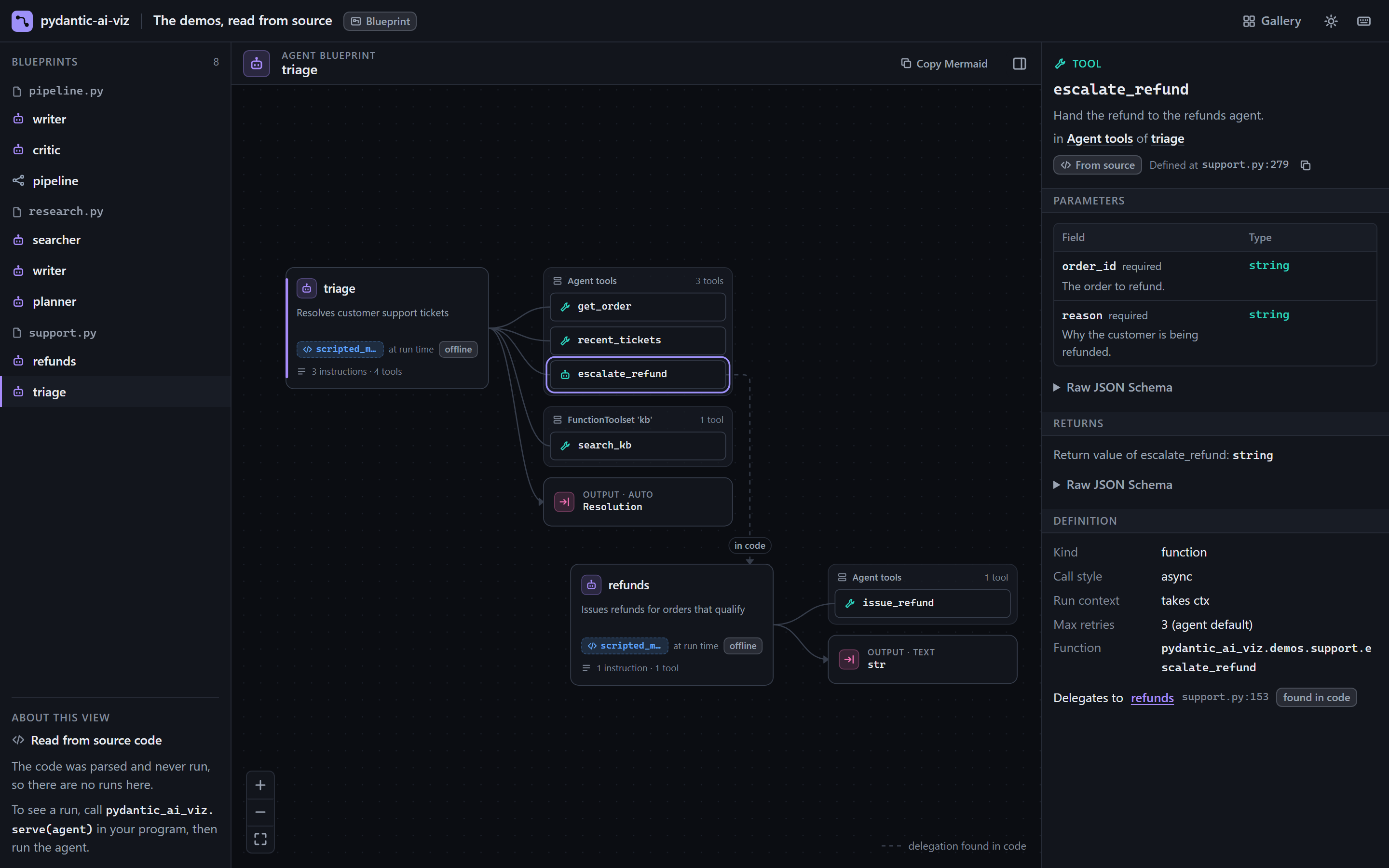
pydantic-ai-viz view src/pydantic_ai_viz/demos showsFrom the command line
| Target | What is drawn |
|---|---|
my_app/ |
Every agent and graph in every .py file below that directory |
my_app/agents.py |
Every agent and graph in that file, including those made inside functions and classes |
my_app/agents.py:support_agent |
The agent assigned to support_agent, and the agents it delegates to |
my_app.agents, my_app.agents:support_agent |
The same, with the file found from the module name; nothing is imported to find it |
gh:owner/repo[@REF][/SUBDIR], or a https://github.com/... URL |
A GitHub repository, fetched with git and read like a directory |
You can pass several targets. Imports between your own files are followed, so an agent in agents.py is drawn with the tools, output model and toolsets it imports from tools.py and models.py, and with the agents it delegates to wherever they live. The CLI reference has every form.
view reads the source and never runs it: nothing is imported, so it does not matter whether the dependencies are installed, and a script that calls its agent at the bottom is safe to view. What the code computes when it runs, such as Agent(get_model()), is shown as that expression, marked "decided at run time", with a warning on the agent card. A model read from an environment variable, as in Agent(os.getenv("MODEL", "openai:gpt-5.2")) or through a helper of your project, is shown as env MODEL, with the model class when the code builds one and the source's default labelled as a default, never as the model. How view works explains what can be read and what cannot.
view serves the viewer and opens your browser, and prints what it read:
Read 11 files without running any code: 5 agents, 0 graphs; 5 warnings about what the source does not spell out (see the viewer)
To write a file instead:
That produces a single HTML file containing only blueprints, which is safe to attach to a design document or a pull request: it holds no run data. All flags are in the CLI reference.
When the source does not say enough, pydantic-ai-viz view --import my_app.agents:support_agent imports the module and reads the live objects instead. That executes the module's code, so use it only on code you trust; see When to use --import.
From Python
analyze reads source the way view does and returns the blueprints as data:
import pydantic_ai_viz as pviz

found = pviz.analyze("my_app/")
for agent in found.agents:
    print(agent.label, agent.location, [tool.name for tool in agent.tools])
blueprint returns the same structure from a live object, which you have imported yourself. It starts no server and no session:
from my_app.agents import support_agent

bp = pviz.blueprint(support_agent)

print(bp.model.name if bp.model else "no model")
for tool in bp.tools:
    print(tool.name, "-", tool.description)
print(bp.warnings)  # anything that could not be read
The result is an AgentBlueprint (or a GraphBlueprint for a graph). Both are Pydantic models, so bp.model_dump() and bp.model_dump_json() work, which is handy for a snapshot test that fails when someone changes an agent's tools or output schema by accident. The fields are documented in the wire format.
To open the picture from Python, use export_html with the agent itself, or serve:
Reading the canvas
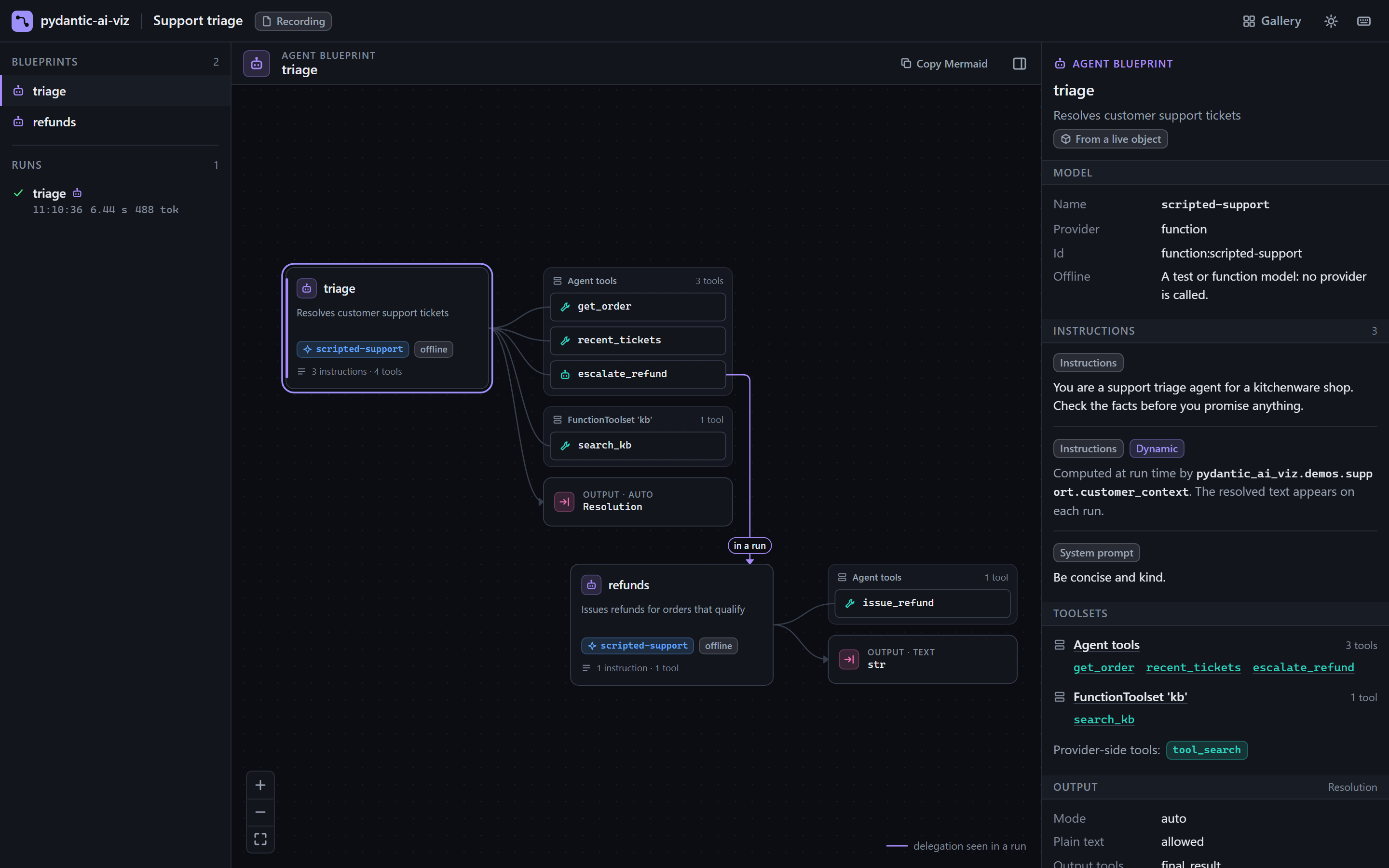
- Agent card
-
The agent's label and description, a chip with the model name (or
env NAMEfor a model name read from an environment variable; hover it for the class and the default), the number of instructions, and a warnings badge if something could not be read. Models from thetestandfunctionproviders get an offline chip, so a diagram of a test setup is never mistaken for production.The label is the agent's
name. An agent created withoutname=has none until its first run (Pydantic AI then infers it from the variable name), so the label falls back to the variable name when the agent was found in a module or file, and toagent-1,agent-2, ... otherwise. - Tool nodes
-
One node per function tool, grouped under a header for the toolset it belongs to: "Agent tools" for
@agent.tooland@agent.tool_plain, and the toolset's own label for eachFunctionToolset. Select a tool to see its description, parameter schema, return schema, whether it takes the run context, and its retry limit. Select a toolset's header to list its tools, each with its parameter count and the first line of its description; picking one there is the same as clicking it on the canvas. - Opaque toolsets
-
A toolset whose tools cannot be listed without running it (an MCP server, or a toolset built by a function at run time) is shown as one placeholder node marked "decided at run time". Its tools are added to the blueprint, marked as observed, as runs offer them to the model: the first run adds the ones it was given, and a later run adds any it was not.
- Output node
-
The output mode (
text,tool,native,promptedorauto, orunknownwhen it could not be read) and the output type name. Select it for the JSON schema as a field table. Output tools such asfinal_resultare part of this node, not tool nodes. - Delegation edges
-
An edge from a tool to another agent's card means "this tool runs that agent". The other agent is drawn in its own row underneath, one step to the right, with its own tools and output.
- A dashed edge, labelled "in code", was found by reading the tool function's code. It is a good guess.
- A solid edge, labelled "in a run", was seen happening in a run. It is a fact.
See Blueprint vs run for how each is found.
The inspector on the right shows the details for whatever is selected, in sections one under the other. For an agent: warnings, model, instructions, toolsets, output, delegates, settings and capabilities. Capabilities that Pydantic AI adds to every agent are folded under a "built-in" disclosure. A blueprint read from source also says where each part is defined, as file.py:line, with a button that copies it.
On a blueprint, what you pick is kept in the page's address, so a link or a reload opens on the same agent, tool, toolset or graph node.
What a blueprint cannot show
A blueprint is drawn without running an agent, so some things are out of reach by design. (A blueprint read from source has a few more gaps, each marked with a warning: see what cannot be read.)
- The text of dynamic instructions. A function decorated with
@agent.instructionsor@agent.system_promptis listed by name, marked dynamic. Its output depends on the run; you see the resolved text on each run's model requests. An f-string or.formattemplate is shown whole, with the parts filled in at run time marked. - Tools of MCP and dynamic toolsets, as described above.
- Delegation that is not visible in the tool's code. A blueprint read from source finds
await refunds_agent.run(...)in a tool whenrefunds_agentcan be traced to an agent: a variable of the module or of an enclosing scope, one imported from another file, an item of a dict or list written out in the source, orctx.deps.refundswhen the source shows the agent being passed as that dependency torun. It also finds an agent the tool hands to a function of your code that runs what it is given; an agent passed to anything else, such as a logging call, is not taken for a delegate. A blueprint read from a live object finds only module-level and enclosing-scope variables. Neither follows a helper function that picks and runs an agent of its own. Edges that were missed appear, solid, the first time the delegation runs.
When a blueprint is read from a live object, a handful of fields (instructions, system prompts, retry limits, output mode, native tools) have no public accessor in Pydantic AI and are read from private attributes. If a Pydantic AI release changes one, that field is left empty and a warning appears on the agent card. Nothing else is affected. The compatibility page lists them.
Next
Blueprints become much more useful with runs on top: Watch live runs.